


GrowIt: Vegetable Garden Care
4.3245.00 Reviews
App Specs
- Version
- 1.2.3
- Updated On
- License
- Free
- Downloads
- 500,000+
- Developer
- Glority Global Group Ltd.
- Categories
- Lifestyle
- Platform
- Android
Screenshots
 Analysis by AppCompare
When I’m standing in front of an empty planter, the hard part isn’t finding enthusiasm; it’s deciding what can realistically grow there and remembering what to do next. GrowIt: Vegetable Garden Care is aimed at that gap between wanting a vegetable garden and managing one. I find it most useful as a guide and organizer for people who want to learn as they go, rather than as a substitute for paying attention to their plants.
From a blank planter to a workable plan
I’d use this section to turn the empty-planter question into a few practical decisions: what the space can support, what I can keep up with, and which plants are worth trying first. Starting with those limits makes it easier to use GrowIt’s guidance selectively, then move into a plan that can survive the changes of an ordinary week.
Start with the space you actually have
Before choosing seeds, I’d take a quick inventory of the growing space: how much room is available, how much sun it gets, what the soil or containers are like, and how much time I can give the garden during an ordinary week. Those details matter more than an ambitious wish list. A small container garden and a sunny backyard bed call for different choices, and a guide is only useful when I compare its advice with the conditions in front of me.
That’s the kind of starting point where this lifestyle app makes sense. Its store summary describes a vegetable and fruit planting guide, and the broader gardening focus is reflected in its plant information, planning tools, tips, and community. I would use it to narrow down possibilities and organize decisions, not to assume that a general recommendation automatically fits every local climate or unusual growing spot.
Getting Started with GrowIt
First things first, downloading and setting up GrowIt: Vegetable Garden Care is a breeze. Available on both Android and iOS, it’s as simple as hitting the download button, and you'll be ready to explore a world of possibilities. The app's interface is clean and intuitive, perfect for both gardening newbies and seasoned pros. It welcomes you with a neat dashboard where you can easily navigate through its features.
GrowIt is made by Glority Global Group Ltd. It is free to download, with in-app purchases listed from $5.99 to $39.99 per item, so I’d check what a particular paid option includes before deciding whether it belongs in my gardening routine. The app has a 4.3 average from around 3.4K ratings, and it has passed 500K installs. It is rated for everyone, which fits a practical, approachable subject like learning to grow food. Its release date is Feb 5, 2024, and version 1.2.3 requires Android 10 or later.
Choose plants with a reason
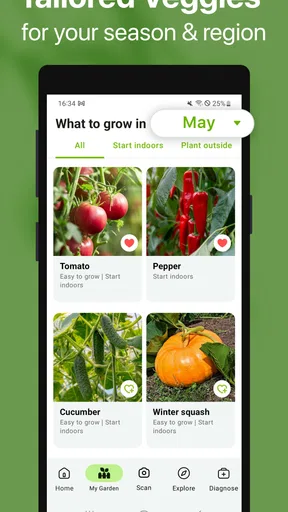
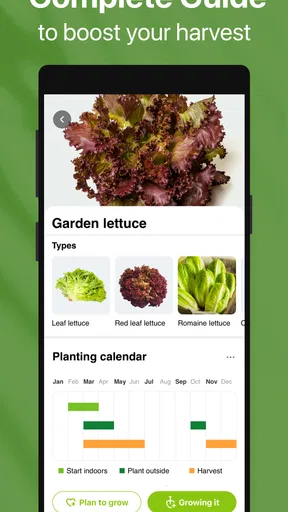
The heart of GrowIt is its extensive plant database. You can search for a wide variety of vegetables, fruits, and herbs. Each entry is packed with details, from planting times to ideal growing conditions. It’s like having a personal botanist in your pocket, ready to offer advice whenever you need it.
Worth Reading Before You Choose

EA SPORTS FC Mobile 26 Is a Bigger Football Game, but It Takes Time

Flipboard Shows What News Apps Must Do Beyond the Feed

Switching to Android Auto Means Rethinking Your Driving Routine

Google Calendar Makes a Crowded Week Easier to Manage

Ludo King Makes the Most of the Minutes Between Plans

Baby Panda World Brings Quick Play to Modern Phones, but Its Game Library Feels Busy
What I love about this feature is how it empowers you to make informed decisions about what to plant. Whether you're in the mood for some fresh basil or want to try your hand at tomatoes, the app helps you understand what works best in your climate and soil type.
My practical tip is to use the plant information as a shortlist rather than a shopping list. I’d compare a few candidates, then pick one or two that suit the light, space, and attention I can provide. That restraint is especially useful for a first garden: growing fewer plants well can teach more than scattering seeds across a crowded bed and struggling to keep up.
Planting guidance also works best when I turn it into a simple sequence: choose a plant, check the suggested conditions, prepare the spot, then note what I actually did. A general planting window can help me plan, but local weather can shift the right moment. If a cold spell or heat wave is approaching, I’d treat the guide as a reference and use local conditions to make the final call.
Make the plan fit a real week
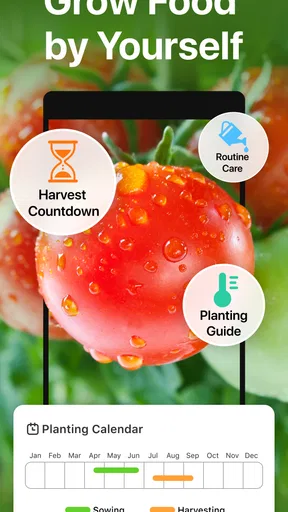
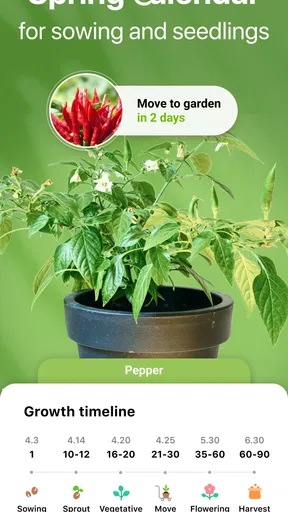
The garden planning tool is another gem within GrowIt. It allows you to map out your garden, deciding which plants go where. This feature is incredibly helpful for those of us who need a visual guide to keep everything organized. You can track your plants' progress, set reminders for watering, and even get alerts on when to harvest.
This planning aspect is great for maximizing space and ensuring that your plants thrive. It’s like having a garden planner and a calendar rolled into one.
A useful way to start is to map only the plants I’ve committed to growing, rather than attempting to design a perfect garden all at once. I’d leave room for access and make a note of where each plant goes. Later, that record can help me remember what occupied a spot and compare how different choices did. For containers, I’d keep the plan especially simple: one clear note per pot is easier to follow than a complicated layout that stops matching reality as soon as something moves.
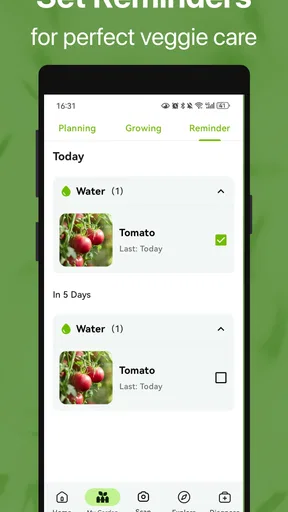
Reminders are helpful when they support observation, not when they replace it. A watering prompt can nudge me to check a plant, but it cannot tell me whether the soil is still damp or whether recent rain has changed the need. I’d treat an alert as a cue to look, then water only if the plant and soil call for it. That small distinction can prevent a tidy schedule from becoming an unhelpful routine.
Bring questions and observations back to the garden
One of the standout features of GrowIt is its vibrant community aspect. You can connect with fellow gardeners to share tips, successes, and even failures. It’s comforting to know you’re not alone in your gardening journey. You can join discussions, ask questions, and provide answers, making it a truly interactive experience.
The community is also a fantastic place to find inspiration. Seeing others’ gardens can spark ideas for your own space, and you might even pick up a few creative planting techniques along the way.
For a useful handoff between the app and the garden, I’d bring a specific question rather than a vague request for help. A clear description of the plant, its growing conditions, and what changed makes it easier for other gardeners to offer relevant suggestions. I’d still compare any community advice with the plant guidance and what I can observe myself; one person’s successful fix may depend on their local weather, soil, or setup.
The same applies when browsing other people’s gardens. Inspiration is valuable, but a layout that works in a large sunny bed may not translate to a shaded balcony. I’d borrow the idea behind a technique, then adapt it to my available room and routine instead of copying the whole setup.
Use advice without letting it run the garden
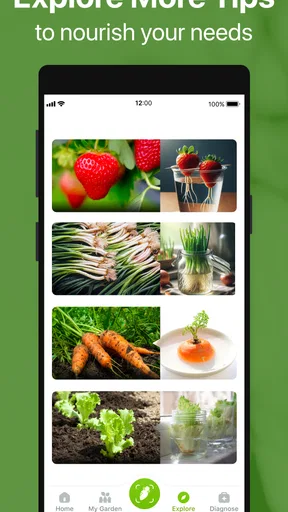
The app also offers a collection of tips and tricks for every stage of the gardening process. From preparing your soil to dealing with pests, GrowIt covers it all. These nuggets of wisdom are particularly useful for beginners who might be unsure about certain aspects of gardening.
Moreover, the app updates regularly with seasonal advice, ensuring that your garden is always in tip-top shape, no matter the time of year.
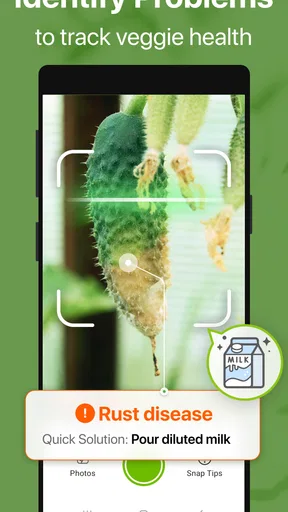
I’d use the tips as a reference when a task comes up, not as a reason to keep checking the app instead of the plants. If something looks wrong, first note what I can see: leaf color, soil moisture, recent weather, and how quickly the problem appeared. That gives me a more grounded starting point than trying several remedies at once. It also makes later advice easier to judge because I can explain what has already been tried.
One trade-off is that any all-purpose gardening guide has to balance broad usefulness with local variation. A tip can be sensible in general but still need adjustment for a particular season or growing space. I’d be cautious with pest or care advice that sounds absolute, especially if the plant’s condition is changing quickly. When the garden is the priority, a local gardening resource or a knowledgeable nearby grower may be a better second opinion.
Where the workflow can snag
The app is a better fit for someone who enjoys learning and keeping a few notes than for someone who wants a completely automatic garden manager. Planning and reminders can organize what I intend to do, but the real work still depends on noticing changes and making decisions. That is not a flaw unique to GrowIt; it is the nature of gardening. Still, users who expect a prompt to diagnose every problem or guarantee a harvest may find the experience less decisive than they hoped.
There is also a difference between a visual plan and a garden that stays fixed. Plants grow, containers move, and weather can change a schedule. I’d update my own notes when I make a change rather than treating the original layout as a permanent record. This adds a little upkeep, but it is more useful than trusting an outdated plan when I’m trying to remember what I planted.
Compared with a paper notebook, GrowIt brings plant references, planning, reminders, tips, and a community together in one place; a notebook, on the other hand, is easier to customize and can capture any detail I want without navigating an app. Compared with searching the web whenever a question comes up, a dedicated gardening app offers a more focused place to return to, while local extension resources or experienced gardeners can be more relevant for region-specific issues. I’d choose based on the job: GrowIt for keeping a beginner’s process together, a notebook for free-form tracking, and local advice when conditions make the answer highly specific.
A realistic routine might look like this: on a weekend, I check the plant guide and decide what suits a sunny container. I map the choice, prepare the pot, and record when I planted it. During the week, a reminder prompts me to inspect the soil rather than water automatically. If leaves later look unusual, I note the change and ask the community a focused question, then compare suggestions with the growing conditions I can see. The result is not a guaranteed harvest; it is a clearer chain from decision to observation, with fewer forgotten steps.
For a first-time grower, that structure can make the garden feel manageable without pretending that plants follow a perfect calendar. For someone already comfortable with planting schedules and record keeping, the strongest reason to try it would be having the guide and community close at hand. If I only wanted a one-off answer, or needed precise local diagnosis, I’d probably reach for a trusted regional source instead of expecting one app to cover every case.
What the harvest depends on
So, is GrowIt: Vegetable Garden Care worth your time? Absolutely. It’s a comprehensive tool that caters to gardeners of all levels. The combination of educational resources, community support, and practical planning tools makes it invaluable for anyone looking to cultivate their own patch of greenery.
Whether you’re planting your first seed or expanding an existing garden, GrowIt offers everything you need to grow with confidence. It's like having a gardening encyclopedia, a social network, and a personal planner, all in one handy app. So, why not give it a try and see how green your thumb can get?
My recommendation is more specific: I’d try it if I wanted help choosing plants, organizing a small growing plan, and learning from other gardeners as questions arise. I’d keep the routine lightweight, use reminders as prompts to inspect rather than commands, and adapt general advice to local conditions. If that sounds like the kind of support you need, GrowIt can be a useful companion from the first planting decision through the season’s small adjustments.
Pros
- User-friendly interface for beginners.
- Comprehensive plant care guides included.
- Community support for gardening tips.
- Customizable alerts for watering schedules.
- Visual plant identification feature.
Cons
- Limited plant database for exotic species.
- Occasional app crashes reported.
- No offline mode available.
- In-app ads can be distracting.
- Subscription required for premium features.
FAQs for GrowIt: Vegetable Garden Care
What is GrowIt: Vegetable Garden Care used for?
GrowIt: Vegetable Garden Care is an app designed to help users manage and optimize their vegetable gardens. It provides gardening tips, plant care guides, and a community platform for sharing experiences and advice. Whether you're a beginner or a seasoned gardener, the app supports your journey from planting to harvesting.
Does GrowIt offer personalized gardening tips?
Yes, GrowIt offers personalized gardening tips based on your location, climate, and the specific plants you are growing. The app uses your input to tailor advice, ensuring that you receive the most relevant information for your garden's success, taking into account local weather patterns and soil conditions.
Is there a community feature in GrowIt?
GrowIt includes a vibrant community feature where users can connect with other gardeners. This allows you to ask questions, share photos, and exchange tips. The community is a great resource for troubleshooting issues, gaining inspiration, and learning from the experiences of fellow gardening enthusiasts.
Are there in-app purchases in GrowIt?
GrowIt offers a range of in-app purchases. While the basic features of the app are free, users can opt for premium content, such as detailed plant guides and advanced gardening tools. These purchases enhance the user experience but are not essential for basic garden management.
Can GrowIt be used offline?
GrowIt requires an internet connection for certain features, such as community interactions and real-time weather updates. However, many of its core functions, like plant care guides and personal garden logs, can be accessed offline, allowing you to use the app in your garden without needing constant connectivity.


